Bypass using Alternative Methods
Explore Tor, mirrors, and other non-VPN strategies to keep Stripchat accessible when traditional tools fail.
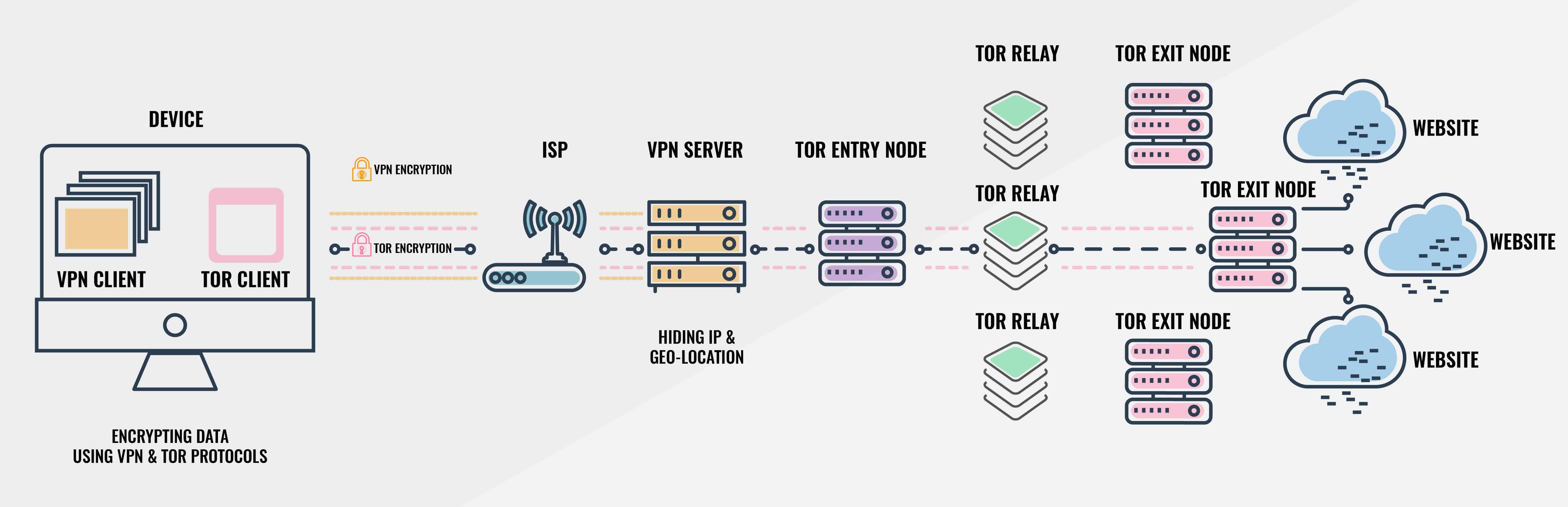
If you're experiencing difficulties accessing Stripchat or Stripchat Live due to network restrictions or censorship, there are several alternative methods to bypass these obstacles. Below are effective strategies for both desktop and mobile users to unblock Stripchat without relying on traditional VPNs, VPN browser extensions, proxy services, or DNS configurations.
Mirrors
Mirrors are duplicate websites hosted on different domains or servers. They offer the same content as the original site but may not be blocked by your internet service provider (ISP) or government.
White-label sites are similar to mirrors. They are authorized copies of the original site, often used to distribute content in regions where the main site is blocked.
Always ensure you're using secure and trustworthy mirrors to protect your privacy and device security.
- Refer to the Gateway section: Top Stripchat Alternatives (verified).
- When searching for mirrors manually, double-check legitimacy to avoid malicious sites.
- Once validated, browse the mirror the same way as the original.
Tor Browser
The Tor Browser anonymizes your internet activity by routing your connection through multiple servers around the world, making it difficult to track or block your access.
- Masks your IP address.
- Bypasses most network restrictions.
- Enhances privacy and security.
Browse Stripchat with Tor
Use Tor Browser on desktop or mobile to mask your origin and bypass blocks.
Refrain from installing additional browser extensions in Tor; they can compromise anonymity. Use the provided security levels instead.
Desktop
- Tor Browser installer
- Download and install
Grab Tor Browser from the official site, run the installer, and launch the app.
- Connect
Allow Tor to connect to the network, then visit stripchat.com through the Tor window.
Mobile
- Tor Browser (Android) or Onion Browser (iOS)
- Install from the official store
Android users install Tor Browser, iOS users install Onion Browser.
- Use built-in privacy settings
Open the app, connect to the Tor network, and navigate to Stripchat within the browser.
SSH Tunnel
An SSH Tunnel creates a secure channel between your device and a remote server, allowing you to bypass local network restrictions.
- Encrypts your internet traffic.
- Bypasses firewall restrictions.
- Does not require additional software for basic setup.
Create an SSH tunnel
Route browser traffic through a remote host using dynamic forwarding.
- Remote SSH server
- Obtain SSH credentials
Use a VPS or remote machine that permits outbound access to Stripchat.
Ensure the remote server firewall allows outbound HTTPS (443) so Stripchat loads correctly.
Desktop
- Terminal (macOS/Linux) or PuTTY (Windows)
- Run dynamic port forwarding
Execute `ssh -D 8080 user@remote_host` or configure PuTTY - Connection - SSH - Tunnels (Dynamic, port 8080).
- Point browser to localhost proxy
Set the browser proxy to SOCKS5 `localhost:8080`, then load Stripchat through the tunnel.
Mobile
- SSH client app (Termius, JuiceSSH)
- Create a dynamic SOCKS tunnel
Add a port forward (Dynamic, e.g., 1080) in the app, connect, and update your mobile browser proxy to `localhost` with that port.
Web-Based Proxy Services
Web proxies allow you to access blocked websites through a webpage intermediary without installing software.
- Quick and easy to use.
- No installation required.
- Works on both desktop and mobile browsers.
- May not support all website features.
- Slower browsing speeds.
- Potential security risks. Free web proxies may inject ads or track your activity. Use trusted services to protect your privacy.
- Visit a reputable web proxy such as proxyium.
- Paste the Stripchat URL into the proxy's address field.
- Browse Stripchat inside the proxy interface.
Browsers with Built-In Unblocking Features
Some browsers are designed to bypass censorship and access restricted content.
- No additional software required.
- Simple toggle to enable or disable.
- Provides unlimited bandwidth.
- Enhanced privacy features.
- Bypass network restrictions seamlessly.
- User-friendly interfaces.
Use browsers with built-in unblocking
Leverage integrated Tor or VPN features to reach Stripchat.
Brave (Desktop)
- Brave Browser
- Open private window with Tor
Install Brave, click the menu - New Private Window with Tor, and load Stripchat.
Psiphon (Android)
- Psiphon Pro app
- Install and connect
From Google Play install Psiphon Pro, enable the tunnel, and browse Stripchat in the in-app browser.
Opera
- Opera Browser (desktop or mobile)
- Enable built-in VPN
Install Opera, open Settings - Privacy & Security - enable VPN, then toggle the VPN in the address bar before visiting Stripchat.
Accelerated Mobile Pages (AMP)
Accelerated Mobile Pages (AMP) is an open-source initiative by Google designed to enhance mobile web performance. Beyond faster loading times, AMP can inadvertently help users bypass certain internet censorship measures.
- Faster Loading Times: Optimized for mobile performance.
- Reduced Data Usage: Efficient loading reduces bandwidth consumption.
- Potential to Bypass Blocks: Access via Google's servers can circumvent some censorship.
- Limited Functionality: Not all features of Stripchat may be available in the AMP version.
- Dependence on Google: Requires access to Google services, which might be restricted in some regions.
- Not Foolproof: Authorities may block AMP services if widely used to bypass censorship.
It is important to note that note all websites support AMP, and the availability of AMP versions may vary. If you cannot find an AMP version of Stripchat, consider using other methods to unblock the site.
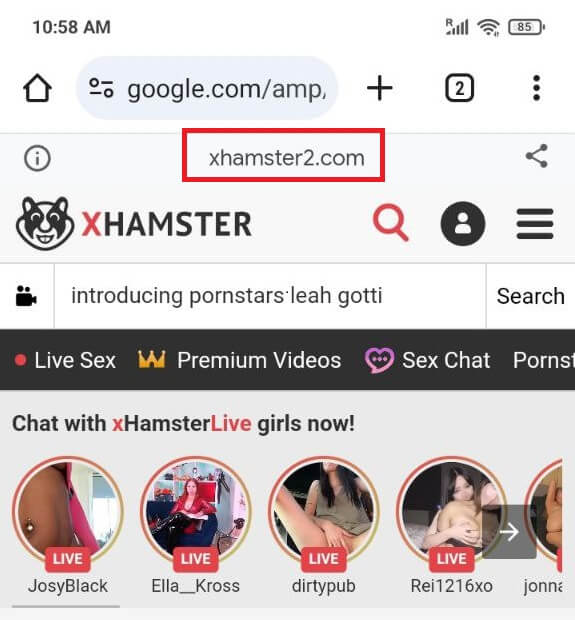
- Content Delivery Through Google Servers: When accessing an AMP page, the content is often served from Google's own servers (
ampproject.orgorgoogle.com), not directly from the original website. - Bypassing Domain Blocks: Since the content comes from Google's domains, which are rarely blocked due to their widespread use, this can bypass filters targeting the original site's URL.
- Encrypted Connections: AMP pages use HTTPS, adding a layer of encryption that can prevent deep packet inspection techniques used by some censorship tools.
- On your mobile device, open Google Search.
- Search for Stripchat content or specific videos.
- Click on results marked with the AMP lightning bolt icon or amp keyword in the URL.
- Modify the Stripchat URL to access its AMP version, if available.
- For example:
https://www.google.com/amp/s/www.Stripchat.com/amp
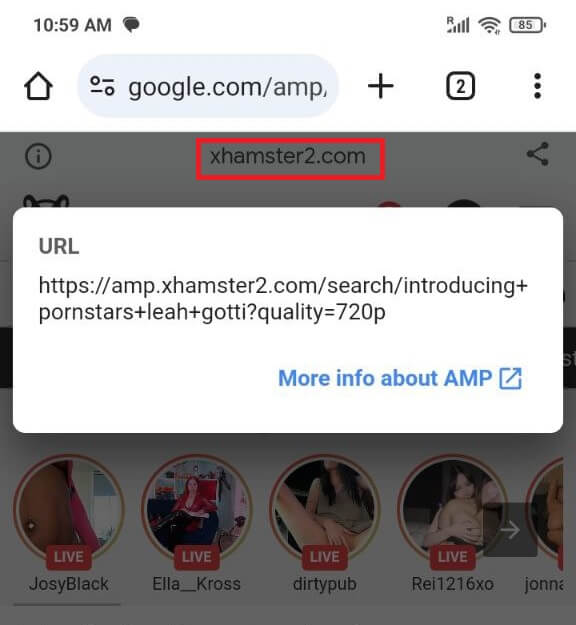
Demonstration of AMP pages in Google Search
Signed Exchanges (SXG)
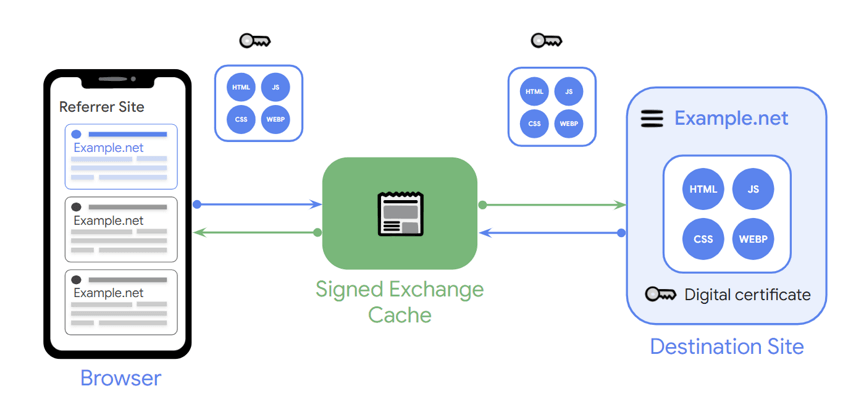
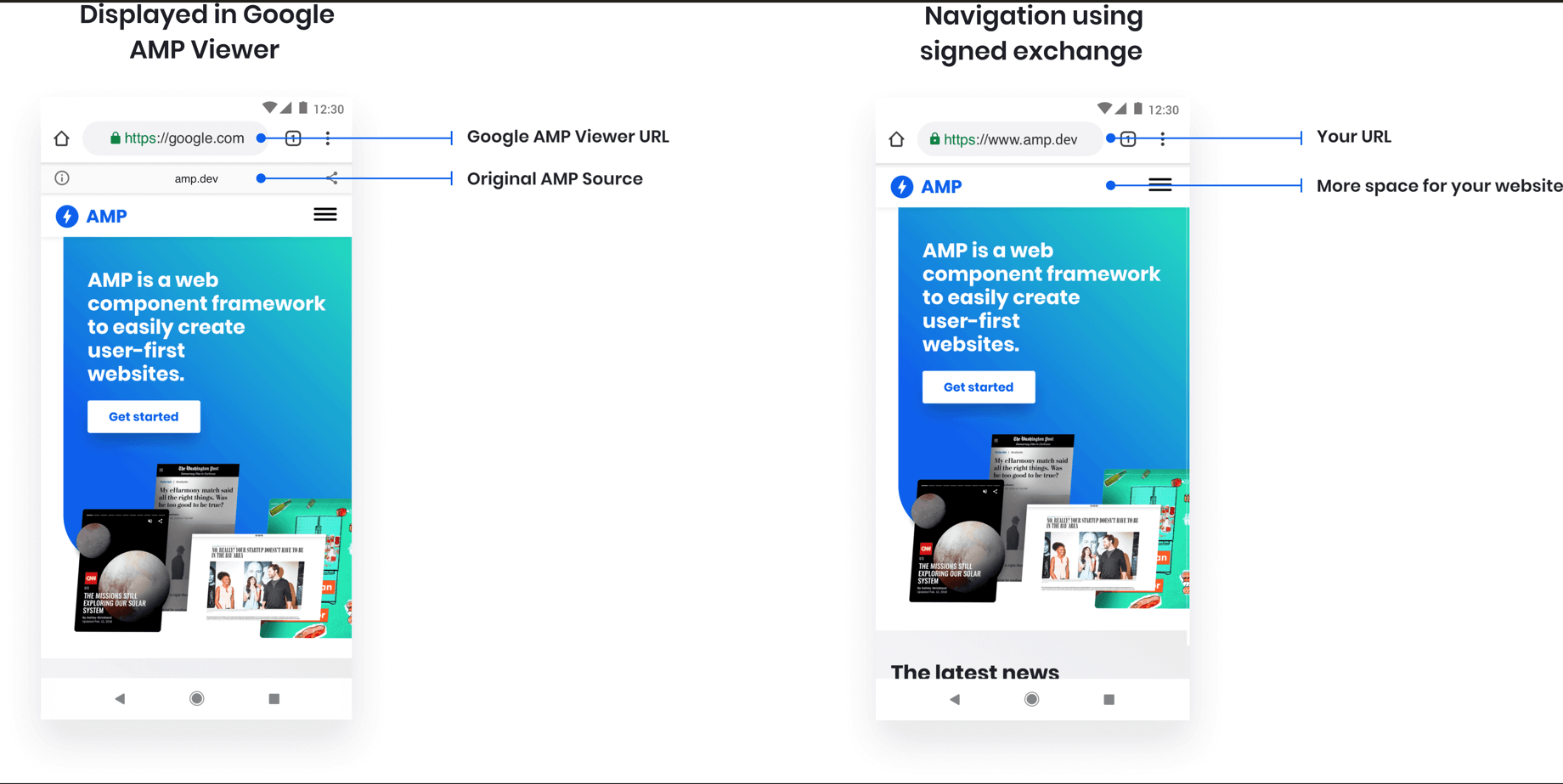
Signed Exchanges (SXG) is a web technology that allows websites to serve signed versions of their content through third-party caches while preserving the original URL in the user's browser.
- Bypass Domain Restrictions: Access content even if the original domain is blocked.
- Improved Loading Times: Benefit from cached content delivery.
- Maintained Security: Content integrity is verified through signatures.
- Website Implementation Required: the site must implement SXG on their end.
- Browser Support: Limited to browsers that support SXG.
- Potential for Blocking: Authorities may block SXG if used extensively for circumvention.
Not all websites support SXG, and the availability of SXG versions may vary. If you cannot find an SXG version of Stripchat, consider using other methods to unblock the site.
- Third-Party Content Delivery: Content is delivered through caches like Google's, not directly from the blocked site.
- Preserved URLs: The original URL remains in the address bar, maintaining user trust and bookmarks.
- Enhanced Privacy: End-to-end encryption can prevent intermediaries from seeing the content.
- Ensure you're using a browser that supports SXG, such as the latest version of Google Chrome.
- Search for Stripchat content using Google Search.
- Click on links that utilize SXG to load the content through Google's cache.
- If available, use direct links to SXG versions of Stripchat pages.
Demonstration of SXG in Google Search