How to Check Geo-Blocking
Learn how to confirm whether Stripchat or other services are blocked in your region and understand why restrictions occur.
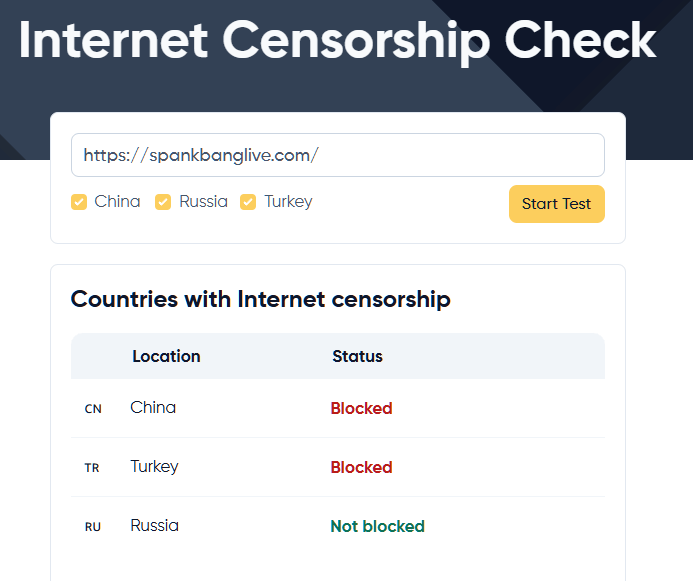
- Countries tracked in geo-blocking table15
- Online availability checkers referenced4
Understanding Geo-Blocking
Geo-blocking is a technology that restricts access to internet content based on a user's geographical location. Websites and online services implement geo-blocking to comply with regional laws, licensing agreements, or to control content distribution. This is achieved by identifying the user's IP address, which is assigned by their Internet Service Provider (ISP) or mobile network provider.
Why Does Geo-Blocking Occur?
- Legal Compliance: Websites may need to adhere to local laws and regulations that prohibit certain content.
- Licensing Agreements: Content providers might have agreements limiting where their content can be distributed.
- Age Verification Requirements: Some regions require strict age verification for adult content to protect minors.
Countries with Strict Geo-Blocking Policies
Several countries enforce stringent geo-blocking measures, especially concerning adult content. Here are some countries known for such restrictions:
| Country | Code |
|---|---|
| China | CN |
| North Korea | KP |
| Iran | IR |
| India | IN |
| Kuwait | KW |
| Türkiye | TR |
| Russia | RU |
| United Arab Emirates | AE |
| Saudi Arabia | SA |
| Pakistan | PK |
| Iraq | IQ |
| Qatar | QA |
| Oman | OM |
| Myanmar (Burma) | MM |
| Malaysia | MY |
Note: Geo-blocking policies may change over time, and this list is not exhaustive.
If you're experiencing issues accessing Stripchat, XhamsterLive, or any other site, it's possible they are geo-blocked in your area. Here are methods to check for geo-blocking on both desktop and mobile devices.
Check whether the site is geo-blocked
Gather data using online tools, command-line checks, and network reroutes.
- Gather basics
Confirm your own IP location and note any error codes when Stripchat fails to load.
Keep a record of each test (date, location, service) so you can present evidence when contacting your ISP or support team.
Online checkers
- Global status tools (DNS Checker, Ping Admin, WebPageTest, Host-Tracker)
- Run availability tests
Enter `stripchat.com` in multiple services and compare results across countries.
- Inspect DNS records
Use the DNS tab (A record lookups) to spot regions returning NXDOMAIN or timeouts.
Command-line
- Terminal or Command Prompt
- Query different resolvers
Run `host stripchat.com 8.8.8.8` or `nslookup` against regional DNS servers to see if requests fail.
- Review outputs
Repeated SERVFAIL or timeouts suggest ISP-level blocking or DNS filtering.
VPN test
- VPN with global locations
- Connect to multiple countries
Switch between regions (e.g., Netherlands vs. US) and reload Stripchat to compare accessibility.
- Document differences
If certain regions load while others fail, geo-blocking or IP-based restrictions are likely.
Official sources
- Review legislation
Search government/ISP notices or age-verification laws in your jurisdiction for explicit blocking guidance.
Web proxies
- Trusted web proxy
- Access via proxy
Load Stripchat through a reputable proxy service to confirm if the site is reachable from external endpoints.
Troubleshooting Access Issues
If Stripchat or XhamsterLive isn't working, here are steps to address common problems.
Possible Reasons
- Poor internet connection.
- Outdated VPN or browser.
- Firewall or antivirus blocking access.
Solutions
- Check Internet Connection:
- Ensure your network is stable.
- Update Software:
- Keep your VPN and browser up-to-date.
- Try Different Servers:
- Switch VPN server locations.
- Restart Devices:
- Reboot your device and applications.
- Clear Cookies and Cache:
- Remove old data that might be causing issues.
- Use Incognito Mode:
- Access the site in private browsing mode.
- Contact Support:
- Reach out to VPN or ISP customer service.